
How Does AI Reduce HVAC Energy Costs?
AI reduces HVAC energy costs by learning your daily habits, watching the weather, and adjusting your heating and cooling system on its own. Instead of running on a fixed schedule, an AI-powered HVAC system makes small, smart changes throughout the day so it uses less energy while keeping your home comfortable. Homeowners and businesses using AI-powered HVAC systems report savings of 20% to 40% on their heating and cooling bills.
HVAC stands for Heating, Ventilation, and Air Conditioning. It is the system that heats your home in winter, cools it in summer, and moves fresh air through your rooms. For most households, HVAC is the single biggest item on the energy bill, eating up close to half of total monthly energy costs, according to the U.S. Department of Energy.
That is where artificial intelligence comes in. AI refers to software that can study patterns, learn from data, and make decisions without being told exactly what to do each time. When you pair AI with your HVAC system, it turns a basic heating and cooling setup into something that thinks, learns, and saves you money on its own.
In this guide, we break down the specific ways AI lowers your energy bills, share verified savings data from real buildings and homes, and show you how to get started with zero technical knowledge.
What Is an AI-Powered HVAC System?
An AI-powered HVAC system is a heating and cooling setup that uses artificial intelligence software to control when, where, and how much energy it uses. It collects data from sensors, weather reports, occupancy patterns, and energy rates, then makes automatic adjustments to reduce waste.
Think of it this way. A regular thermostat works like an alarm clock. You set a temperature, and it runs the same way every day no matter what. It does not know if you left the house early. It does not know a cold front is coming tonight.
An AI-powered system is different. It acts like a personal energy manager. It tracks when people come and go, checks the weather forecast, monitors how each room heats up or cools down, and uses all of that information to run your HVAC system at the lowest possible cost while keeping you comfortable.
The most common way homeowners use AI in HVAC is through smart thermostats. Brands like Google Nest, Ecobee, and Honeywell Home all use AI and machine learning to study your habits and adjust temperatures on their own. For larger commercial buildings, companies like BrainBox AI and Trane offer AI platforms that connect to existing building management systems.
How Does AI Learn Your Schedule to Save Energy?
AI learns your schedule by tracking when you are home, when you leave, and when you sleep. It then adjusts heating and cooling to match your routine so energy is not wasted on an empty house.
For example, if you leave for work at 8 AM every weekday, the AI picks up on that pattern within the first week or two. It starts dialing back your HVAC system shortly after you leave. Then, about 30 minutes before you usually return, it brings the temperature back to where you like it.
This is one of the biggest energy savers because many people forget to adjust their thermostat before leaving. The U.S. Department of Energy reports that simply setting your thermostat back 7 to 10 degrees for 8 hours a day can cut heating and cooling costs by up to 10% a year. AI does this for you every single day, without you having to remember anything.
Some smart thermostats, like Google Nest, also use geofencing. This feature tracks your phone’s location. When you leave a set area around your home, the thermostat switches to an energy-saving mode. When you start heading home, it kicks back on. You walk through the door to a comfortable house without a single watt of wasted energy.
Can AI Use Weather Data to Lower Heating and Cooling Bills?
Yes. AI-powered HVAC systems pull live weather data and local forecasts so they can adjust your heating and cooling before conditions change, not after.
Here is a simple example. Say it is a hot Tuesday afternoon, but the forecast shows a cool breeze coming in by evening. Your old thermostat would keep the AC blasting at full power until you manually turned it down. An AI system sees the forecast, knows the temperature will drop naturally, and eases back on the cooling early. Less energy used, same level of comfort.
The same works in reverse. If a heatwave is predicted for tomorrow morning, the AI might pre-cool your home during the night when electricity rates are lower. By the time the heat hits, your house is already cool and the system can coast through the expensive midday hours.
This kind of weather-aware control is something no manual thermostat or basic programmable timer can do. It is one of the reasons AI-powered systems consistently outperform traditional setups by a wide margin.
How Does Zone Control with AI Cut Energy Waste?
Zone control with AI cuts energy waste by heating or cooling only the rooms that are being used, instead of treating the entire home the same.
In a typical home, the HVAC system sends the same amount of conditioned air to every room. That means the guest bedroom nobody has stepped into for weeks gets the same cooling as the living room where the whole family sits every evening. That is a lot of wasted energy.
AI-driven systems paired with occupancy sensors change this. The sensors detect which rooms have people in them. The AI then directs more heating or cooling to those rooms and dials it back in empty ones.
This approach is called zone-based climate control, and the savings add up fast. If your system is running efficiently in two or three rooms instead of six, your energy use drops significantly without anyone feeling a difference in comfort.
Smart thermostat brands like Ecobee sell room sensors specifically for this. You place them in the rooms you use most, and the AI uses their data to prioritize those spaces. It is one of the simplest upgrades with some of the biggest returns.
What Is Predictive Maintenance and How Does It Save Money?
Predictive maintenance is when AI monitors your HVAC equipment in real time, spots early signs of wear or damage, and warns you before a small issue turns into an expensive breakdown.
Most HVAC systems run until something goes wrong. A clogged filter, a slow refrigerant leak, or a motor that is starting to fail can quietly drive your energy bill up by 10% to 25% for months before anyone notices. Then the system breaks down completely, usually at the worst possible time, and you are stuck paying for an emergency repair.
AI changes this pattern. It continuously reads data from your HVAC equipment, things like vibration levels, temperature output, pressure readings, and airflow rates. When something starts to drift outside normal range, the AI flags it immediately.
The savings from this approach are well documented:
- Emergency HVAC repairs cost 60% to 70% more than planned service visits
- AI-driven monitoring has been shown to reduce unplanned breakdowns by up to 91%
- Maintenance costs drop by roughly 38% when AI handles early detection
These figures come from studies reviewed by industry sources including Oxford Maintenance (OxMaint) and Cimetrics, both of which track building performance data across hundreds of facilities.
How Does AI Use Off-Peak Energy Pricing to Save Money?
AI saves money on energy bills by shifting your HVAC usage to off-peak hours when electricity costs less, and pulling back during peak hours when rates are highest.
Most utility companies use time-of-use pricing. Electricity is cheaper late at night and early in the morning. It gets more expensive during late afternoon and evening, usually between 4 PM and 9 PM, when demand is highest.
An AI-powered HVAC system knows exactly when those price changes happen. So it pre-cools or pre-heats your home during the cheap hours, then reduces its output during the expensive window. You stay comfortable the entire time, but your bill comes in noticeably lower.
Some AI systems also connect with your utility company’s demand response programs. These programs reward you with credits or rebates for reducing energy use during periods of high grid demand. The AI handles the adjustments for you. You do not have to think about it or lift a finger.
What Is Fault Detection and Why Does It Matter for Energy Costs?
Fault detection and diagnostics, often called FDD, is a process where AI finds hidden inefficiencies in your HVAC system that quietly waste energy without anyone knowing.
One of the most common hidden problems in commercial HVAC systems is the “reheat” issue. The system cools air down, then a reheat coil warms it right back up. This wastes a huge amount of energy and happens far more often than building managers realize.
AI-powered FDD catches problems like this by constantly comparing how the system should be performing versus how it is performing. When there is a gap, it alerts you and often tells you exactly what needs to be fixed.
According to data from Cimetrics, a building analytics company, fixing these hidden faults can reduce HVAC energy use by an additional 10% to 15% on top of other AI savings. For large commercial buildings, that translates to thousands of dollars saved every year.
Does an AI HVAC System Get Smarter Over Time?
Yes. One of the most valuable features of AI in HVAC is that it improves its performance the longer it runs. Unlike a standard thermostat that works the same way on day one as it does on day 1,000, an AI system collects more data every day, and it uses that data to make better decisions.
During the first one to two weeks, the AI is studying your patterns, your home’s insulation properties, how quickly rooms heat up or cool down, and how outside weather affects indoor temperatures. By month two or three, it has a very accurate picture of your home’s energy behavior.
By month six, most users report that their savings have grown compared to the first month. The AI has refined its timing, learned seasonal shifts, and adapted to any changes in your routine. It is constantly getting better at spending less energy while keeping you just as comfortable.

How Much Money Can AI Save on HVAC Bills?
AI can save homeowners 20% to 30% on heating and cooling bills. Commercial buildings typically see savings of 25% to 40%. The exact amount depends on climate, building size, system age, and how efficiently the HVAC was running before.
Here are three verified examples from real installations:
45 Broadway, Manhattan, New York City
A 32-story office building at 45 Broadway installed BrainBox AI to manage its HVAC system. After 11 months, the building reported a 15.8% reduction in HVAC energy use, saved over $42,000, and eliminated 37 metric tons of carbon dioxide emissions. This case study was reported by TIME Magazine in its coverage of AI and building energy.
87 Schools in Stockholm, Sweden
The city of Stockholm deployed AI tools across 87 school buildings. The result was an 8% drop in electricity consumption and a reduction of 64 tons of CO2 emissions per year. For public schools working with tight budgets, these savings free up funds that go directly back into classrooms and programs.
Residential Smart Thermostat Users (U.S.)
On the residential side, data from leading smart thermostat brands shows strong savings:
- Google Nest users save an average of $131 to $145 per year on energy bills
- Ecobee users report annual savings of up to $250
- Field data from The Furnace Outlet shows smart HVAC homes pay 20% to 30% less in heating and cooling costs compared to homes with standard thermostats
If your household spends about $2,000 a year on heating and cooling, a 25% savings means $500 back in your pocket every year. A smart thermostat costing $100 to $250 would pay for itself in as little as 3 to 6 months.
Can AI Work with My Existing HVAC System?
Yes. In most cases, AI can be added to your current HVAC system without replacing any equipment. You do not need a brand-new furnace or air conditioner to start using AI.
For homeowners, the easiest entry point is a smart thermostat. Devices like Google Nest, Ecobee, and Honeywell Home are designed to replace your existing thermostat. Installation typically takes 20 to 30 minutes with basic tools, and all three brands provide step-by-step video guides.
Most smart thermostats work with standard HVAC systems including central air, heat pumps, forced air, and radiant heating. Before buying, each brand offers a free online compatibility checker on their website where you enter your system details to confirm it will work.
For commercial buildings, AI platforms from companies like BrainBox AI and Trane Autonomous Control layer on top of existing building management systems (BMS). There is no need for new ductwork, new equipment, or a major construction project. The AI connects to the existing sensors and controls, and starts working within days.
Many utility companies also offer rebates of $50 to $100 when you install an Energy Star certified smart thermostat. Check your local energy provider’s website to see what is available in your area.
How Do I Get Started with AI HVAC at Home?
Getting started is simple and does not require any special technical knowledge. Here is a five-step plan anyone can follow:
- Pick a smart thermostat. Google Nest, Ecobee, and Honeywell Home are the top three options for home use. Google Nest is the simplest to set up. Ecobee is best if you want room sensors. Honeywell Home is a solid all-around pick for those who already use Honeywell products.
- Check for rebates before you buy. Visit your utility company’s website or call their customer service line. Many providers offer cash rebates, instant discounts, or even free smart thermostats through energy-saving programs.
- Install and let it learn. Follow the step-by-step instructions that come in the box. After installation, give the AI one to two weeks to study your routines. Try not to keep changing the temperature manually during this learning period.
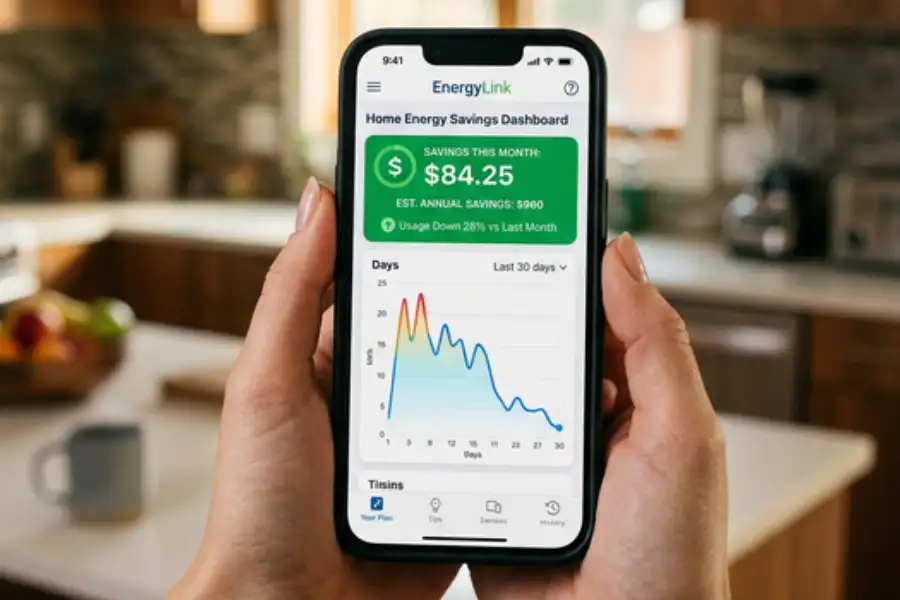
- Check your energy reports weekly. Every major smart thermostat brand includes a free app with detailed energy reports. Review these once a week to track how much energy you are saving and where the biggest improvements are coming from.
- Add room sensors for bigger savings. If certain rooms in your home sit empty for most of the day, placing occupancy sensors in your main living areas lets the AI focus energy there and pull back everywhere else.
That is the full process. Five steps, no complicated wiring, and no need to hire a professional in most cases.
Does AI in HVAC Help the Environment?
Yes. Using AI to reduce HVAC energy use directly lowers carbon emissions and helps the environment.
Buildings account for nearly 40% of total energy consumption in the United States and produce a significant share of greenhouse gas emissions, according to the U.S. Energy Information Administration. HVAC systems are the single largest energy user within those buildings.
When AI reduces the energy your HVAC system uses, it means less electricity needs to be generated. In many parts of the country, that electricity still comes from natural gas, coal, or other fossil fuels. Less demand means fewer emissions.
A 2024 study by the Lawrence Berkeley National Laboratory estimated that widespread AI adoption in buildings could reduce energy consumption and carbon emissions by 8% to 19%. With aggressive policy measures, the reductions could be even larger.
On an individual level, even a single home switching to an AI-powered smart thermostat reduces its carbon footprint by the same amount as planting several trees each year. When millions of homes and buildings make this switch, the combined impact is significant.
What Are the Common Concerns About AI in HVAC?
Many people have questions before trying AI-powered heating and cooling. Here are the most common concerns and straight answers to each one.
Will AI make my home too hot or too cold?
No. AI systems are designed with comfort as the top priority. Energy savings come second. If the temperature ever feels off, you can adjust it from your phone or the thermostat itself, and the AI will learn from that correction going forward.
Is my personal data safe with a smart thermostat?
Reputable brands like Google Nest, Ecobee, and Honeywell Home use encryption to protect your data. Your usage patterns stay on your account and are used only to manage your comfort and energy savings. Always buy from well-known manufacturers with published privacy policies.
What happens if my Wi-Fi goes down?
All major smart thermostats have a backup mode. If your internet connection drops, the thermostat continues running based on its last saved schedule. You will not lose heating or cooling.
Can renters use a smart thermostat?
Yes. Smart thermostats are designed to be installed and removed easily. Save your old thermostat so you can put it back when your lease ends. Most landlords allow this swap as long as you restore the original unit when you move out.
What Is Coming Next for AI and HVAC?
AI in HVAC is moving quickly. Here is what to expect in the next few years:
- Full smart home connection. Your AI thermostat will communicate with smart blinds, lighting systems, and even electric vehicles to coordinate energy use across your entire household.
- Renewable energy pairing. AI will time your HVAC usage to match periods when solar or wind power is available on the grid, making your home greener without any effort on your part.
- Personal comfort profiles. Future systems will recognize individual family members and adjust the temperature differently for each person based on their preferences.
- Voice-first control. Managing your HVAC through Google Assistant, Alexa, or Siri will become even more precise, letting you give natural commands like “make the bedroom cooler at bedtime.”
The technology is growing fast, and the costs keep dropping. The sooner you start, the sooner the savings add up.
Frequently Asked Questions
How much does AI save on HVAC energy costs?
Homeowners typically save 20% to 30% on their heating and cooling bills. Commercial buildings see savings of 25% to 40%. The exact amount varies based on your local climate, building size, insulation quality, and how your HVAC system was performing before.
Do I need to replace my HVAC system to use AI?
No. A smart thermostat is all most homeowners need. It connects to your existing system and starts learning your patterns right away. For commercial buildings, AI software platforms layer on top of your current building management system without any equipment changes.
Which smart thermostat is best for saving energy?
Google Nest is best for people who want the simplest setup. Ecobee is best for larger homes because it comes with room sensors. Honeywell Home is a reliable choice for people already comfortable with Honeywell products. All three use AI to learn your habits and reduce energy waste.
How fast does an AI thermostat pay for itself?
Most smart thermostats cost between $100 and $250. With yearly savings of $130 to $250, the average payback period is 3 to 6 months. After that, every dollar saved goes straight into your pocket.
Is AI HVAC only for big commercial buildings?
No. AI-powered smart thermostats are made specifically for regular homes. In fact, residential users often see a faster return on investment because the upfront cost is so low compared to the savings.
Can AI help reduce HVAC costs in old or poorly insulated buildings?
Yes. AI is especially effective in older buildings because it can identify inefficiencies that have gone unnoticed for years. Even without physical upgrades, AI can reduce energy waste by improving how and when the existing system runs.
Does AI control both heating and cooling?
Yes. AI manages heating, cooling, and ventilation. It adjusts its behavior based on weather conditions, room occupancy, time of day, and energy prices. Whether it is a freezing winter night or a scorching summer afternoon, the AI makes sure your system runs as efficiently as possible.
What is the difference between a smart thermostat and an AI thermostat?
A basic smart thermostat lets you control your HVAC from your phone and set schedules remotely. An AI thermostat goes further. It learns your patterns, predicts your needs, adjusts to weather changes, and gets better over time without you having to program anything. Most modern smart thermostats from Google, Ecobee, and Honeywell already include AI features.
Final Thoughts
Your HVAC system is likely the biggest energy expense in your home or building. For years, there was not much you could do about it besides adjusting the thermostat by hand and hoping for mild weather.
AI has changed that. It gives you a smarter, easier, and more affordable way to keep every room comfortable while spending far less on energy. It studies your habits, watches the weather, catches equipment problems early, and squeezes every bit of efficiency out of your system, all on its own.
The data backs it up. From a 32-story Manhattan office building saving $42,000 a year to everyday homeowners cutting their bills by 20% to 30% with a $150 thermostat, the results are clear and well documented.
Whether you start with a single smart thermostat or a full AI building management platform, the savings are real, and they start from day one.
Your next energy bill could be the one that makes you smile.