AI Scheduling Software for Cleaning Companies: How It Works, Who Needs It, and Which One to Pick
If you run a cleaning business, you already know how much time scheduling eats up. Between client calls, last-minute cancellations, and keeping your crew on the right track, it can feel like half your day is gone before any cleaning even starts.
I have spent years working with cleaning business owners and testing scheduling tools, and one thing is clear. The companies that grow fastest are the ones that stop doing everything by hand and let AI handle the scheduling side of things.
This guide answers every question you probably have right now about AI scheduling software, from what it does and how it works, to which tools are worth your money and how to avoid picking the wrong one.
What Is AI Scheduling Software for Cleaning Companies?
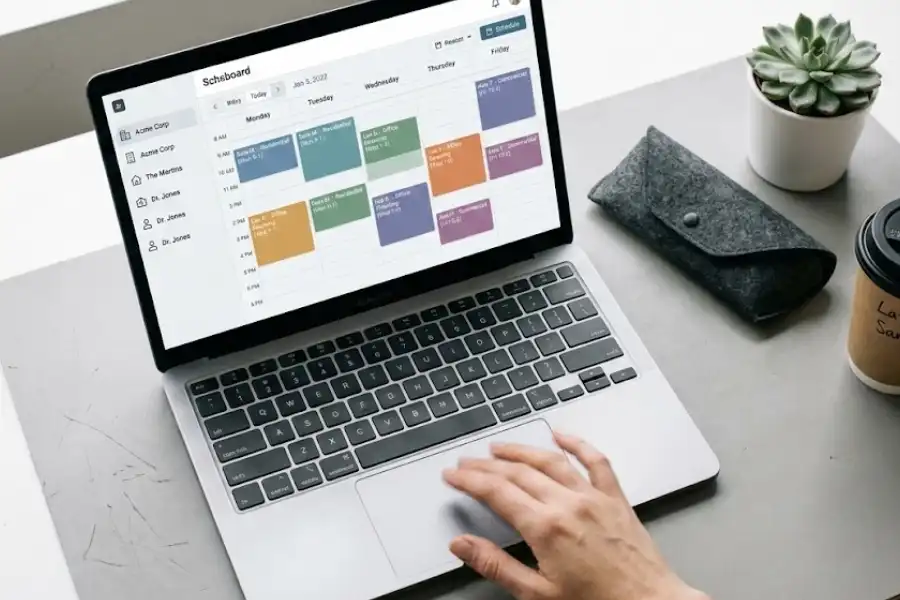
AI scheduling software is a digital tool that uses artificial intelligence to assign cleaning jobs, manage your team’s calendar, and handle client bookings without you doing it manually. It connects your client requests, your team’s availability, and your service areas into one system that runs on its own.
Unlike a basic calendar app or a spreadsheet, AI scheduling software thinks ahead. It looks at where your cleaners are, which jobs they already have, and how far the next client lives. Then it picks the best match and fills the schedule for you.
Think of it the way Google Maps works. Google Maps does not pick a random road. It checks traffic, distance, and time before showing you the fastest option. AI scheduling does the same thing, but for your team’s whole workday.
How Does AI Scheduling Work for a Cleaning Business?
It works in five simple steps. Once you set it up, the whole process runs without you needing to touch it:
- A client requests a cleaning. They visit your website, tap a booking link, or call your number. Many AI tools include chatbots that take bookings around the clock, even at 2 AM on a Sunday.
- The software checks your calendar. It instantly sees who is free, where each cleaner is located, and what jobs are already lined up for that day.
- It picks the right cleaner. The AI matches the job to the best available cleaner based on location, skill set, availability, and drive time.
- Your team gets the details. Each cleaner sees the job pop up on their phone app with the address, time, cleaning type, and any special notes from the client.
- The client gets a reminder. The software sends a text or email on its own so nobody forgets, which helps cut down on missed appointments.
That is the whole process. You do not have to call anyone, text anyone, or check a spreadsheet. The software handles it from start to finish.
Why Do Cleaning Companies Need AI Scheduling Software?
Cleaning companies need AI scheduling because manual scheduling wastes time, loses clients, and creates mistakes that cost money. According to the U.S. Bureau of Labor Statistics, there are over 4.4 million people employed in building and grounds cleaning occupations across the country, which means the market is crowded and even small efficiency gains can give your business a real edge. Here are the biggest reasons cleaning business owners are making the switch:
Does AI Scheduling Prevent Double Bookings?
Yes. This is one of the first problems it solves. When you schedule by hand or through texts and phone calls, it is easy to accidentally send two cleaners to the same house while another client gets no one. AI software keeps every booking synced in one place. If a time slot is taken, nobody else can book it. Double bookings become a thing of the past.
Does It Save Time on Driving Between Jobs?
Yes, and the savings are significant. AI scheduling groups jobs by area, so your cleaners spend less time on the road and more time cleaning. Based on data from companies like Fieldproxy and FieldCamp, smart route planning can cut travel time by 20 to 30 percent. For a team of five cleaners, that could save dozens of hours and hundreds of dollars in fuel every single month.
Can Clients Book Cleanings After Business Hours?
Yes. Most people look for cleaning services during the evening or on weekends, exactly when most small businesses are closed. AI scheduling software gives your clients an online booking page that works 24 hours a day, 7 days a week. They pick a date, choose a service, and the system confirms it right away. No missed calls. No lost leads.
Does It Reduce No-Shows?
Yes. Automatic text and email reminders go out before each appointment without you lifting a finger. According to industry reports, businesses using automatic reminders see a drop in no-shows by up to 40 percent. That means fewer wasted trips and more completed jobs each week.
Does It Keep My Team Organized?
Yes. Every cleaner gets a clear, up-to-date schedule on their phone. They know exactly where to go, what time to arrive, what type of cleaning the client wants, and any special instructions. No confusing group texts. No morning phone calls. Everyone stays on the same page.
What Does AI Scheduling Look Like in a Real Cleaning Business?
Let me show you a side-by-side comparison so you can see how much changes when a cleaning company starts using AI scheduling.
Before AI Scheduling
Sarah runs a residential cleaning company with 6 employees in Dallas, Texas. Every morning, she wakes up at 5:30 AM to plan the day. She opens her notebook, checks which clients are booked, texts each cleaner their assignments, and hopes nobody calls in sick. When a new client calls at 2 PM wanting a same-day booking, Sarah has to stop everything, check who is free, and call back later. By the time she responds, the client has already booked with a competitor.
After AI Scheduling
Sarah sets up AI scheduling software. Now, clients book directly from her website. The system assigns the closest available cleaner on its own. If someone calls in sick, the software reassigns their jobs to another team member within seconds. Sarah spends 10 minutes checking her dashboard in the morning, and the rest of her day is free to focus on growing the business. She has gained back nearly 15 hours every week, time she now uses to bring in new clients and train her team.
That kind of difference is why cleaning companies across the country are switching to AI scheduling. It is not a luxury anymore. For businesses with more than a few employees, it is becoming a necessity.

What Features Should You Look for in AI Scheduling Software?
Not every scheduling tool is built the same. Some are made for large corporations. Others are designed for small service businesses, and those are the ones cleaning companies should focus on. Here are the features that matter most:
Does It Offer Smart Route Planning?
Smart route planning groups nearby jobs together so your cleaners spend less time driving. This is one of the most valuable features because it saves fuel, reduces wear on vehicles, and lets your team fit more jobs into each day.
Can Clients Book Online Without Calling?
Your software should include a simple booking page that you can add to your website. Clients should be able to see available times, pick their service, and confirm their appointment in under a minute. If they have to call you to book, you will lose clients to competitors who make booking easier.
Does It Send Automatic Reminders?
Yes, and this is a feature you should not skip. Text and email reminders sent before each appointment cut no-shows dramatically. The best tools send reminders to both your clients and your cleaners.
Is There a Mobile App for Cleaners?
A mobile app is essential. Your cleaners need to see their schedule, get driving directions, check special client notes, and mark jobs as complete, all from their phone. If the software does not have a mobile app, skip it.
Does It Handle Recurring Bookings?
Most cleaning clients book weekly, bi-weekly, or monthly. The software should let you set up recurring appointments that repeat on their own without you entering them again each time. This saves hours of work every month.
Can It Adjust to Last-Minute Changes?
The cleaning business moves fast. Clients cancel. New requests come in. A cleaner gets stuck in traffic. Your software should adjust the schedule right away when something changes, without you having to redo everything by hand.
Does It Include Invoicing and Payments?
The best scheduling tools let you create invoices and collect payment through the same app. This removes the headache of chasing clients for checks or managing a separate accounting system.
Can You See Reports and Business Numbers?
You should be able to see how many jobs your team completed, which cleaner is the most efficient, and where your revenue is coming from. Good reporting helps you spot problems early and make smarter business decisions.
Which AI Scheduling Software Options Are Best for Cleaning Companies?
There are several strong options on the market right now. Each one has different strengths depending on your business size, budget, and what you need most. Here is a breakdown of the top choices based on my research and testing:
- FieldCamp is one of the strongest AI-first options. It offers drag-and-drop scheduling, smart route planning, live GPS tracking, and a natural language command center. You can type “schedule Maria for the 3 PM job on Oak Street” and it assigns the job. Best for growing teams that want heavy AI features.
- Jobber is one of the most widely used field service platforms in North America. It handles scheduling, invoicing, quoting, and client management in one place. Its AI features are growing, and it works well for cleaning companies that need a reliable system that can grow with them.
- Housecall Pro has a polished, easy-to-use design and strong customer communication tools. It offers a Cleaning Edition built specifically for residential cleaning businesses and includes AI-powered call answering, so you never miss a lead.
- ZenMaid was built from the ground up for maid services. It is simple, focused, and great at managing recurring schedules for residential cleaning. Best for small residential-only companies.
- Zoho Bookings is a solid option if you already use Zoho products like Zoho CRM or Zoho Invoice. It offers AI-powered setup, appointment management, and staff scheduling that connects with the rest of the Zoho ecosystem.
- QuoteIQ is a full-package platform with AI estimating, around-the-clock call answering, customer self-quoting, and detailed business reports. It was built by people who run service businesses themselves, which shows in how well it fits real-world workflows.
- ServiceHub fits best for small cleaning teams under 10 employees. It offers AI booking, text reminders, and online payments at a price point that works for businesses on a tight budget.
The right tool depends on three things: your team size, the features you need most, and how much you can spend each month. I always recommend trying at least two or three free trials before committing.
What Size Cleaning Business Needs AI Scheduling?
AI scheduling helps cleaning businesses of every size, but the benefits look different depending on how big your team is.
Solo Cleaners and Small Teams (1 to 3 People)
If you work alone or with one or two helpers, you probably do not need heavy-duty route planning for a big fleet. But online booking, automatic reminders, and simple invoicing will still save you real time every day. Even saving one hour a day adds up to over 350 hours a year, which is time you could use to bring in more clients or take a day off.
Mid-Size Teams (4 to 15 People)
This is where AI scheduling makes the biggest difference. You are big enough that managing everyone’s schedule by hand is painful, but small enough that hiring a full-time office manager does not make sense. The software fills that role at a fraction of the cost, usually between 50 and 150 dollars per month depending on the platform.
Large Cleaning Operations (15 or More People)
At this size, you are running multiple crews across different neighborhoods or even different cities. You might serve both residential and commercial clients with different service types, pricing, and shift patterns. AI scheduling becomes essential for keeping all of that straight without someone spending their entire day on logistics.
What Are the Honest Downsides of Switching to AI Scheduling?
No tool is perfect, and I would not trust any guide that does not tell you the downsides. Here are the real challenges you should prepare for:
Is There a Learning Curve?
Yes, but it is short. Most cleaning business owners tell me they felt comfortable with their new software within one to two weeks. The harder part is getting your cleaners to use the app, especially if some of them are not great with technology. Be patient, show them how it works in person, and give them a few days to get used to it.
Is It Hard to Move My Existing Data?
It takes effort, but you only have to do it once. If your client list lives in a spreadsheet, a notebook, or your memory, you will need to enter everything into the new system. Some platforms offer help with data migration, which can save you a lot of time. Always ask about this before you sign up.
How Much Does It Cost Each Month?
Most AI scheduling platforms charge between 30 and 200 dollars per month depending on your team size and the features included. For solo cleaners, there are free or low-cost plans. For teams of 4 or more, you will likely spend 50 to 150 dollars per month. The real question to ask is: does it save me more money (in time and missed bookings) than it costs? For most teams with 4 or more employees, the answer is clearly yes.
Will Every Tool Work for My Type of Cleaning Business?
No. Some software is built for residential cleaning, and others are designed for commercial contracts. A few try to handle both. If you pick a tool that does not match your business type, you will end up paying for features you never use. That is why free trials exist. Use them.
How Do You Choose the Right AI Scheduling Software?
Picking the right tool does not have to be complicated if you follow a clear process. Here is the step-by-step approach I recommend to every cleaning business owner I work with:
- Write down your biggest problems. Is it double bookings? Driving too far between jobs? Missing client calls? Know what you are trying to fix before you start shopping.
- Set a monthly budget. Decide how much you can spend each month before you look at any software. This keeps you from overspending on features you do not need.
- Look for cleaning-specific features. Generic scheduling apps work for some industries, but cleaning companies need things like recurring bookings, crew management, supply tracking, and online booking pages. Make sure the tool has those.
- Try before you pay. Nearly every good platform offers a 7 to 14-day free trial. Set it up, run your real schedule through it for a week, and have your team try it too. If it does not make your day easier within a week, it is probably not the right fit.
- Read honest reviews from other cleaning companies. Do not only read the testimonials on the software’s own website. Check sites like G2, Capterra, and Trustpilot where real business owners leave honest feedback.
- Test the customer support. Send them a question before you buy. How fast do they respond? How helpful is the answer? When your schedule crashes at 7 AM on a Monday, you need support that responds in minutes, not days.
- Make sure it can grow with you. If you have 5 cleaners now but plan to reach 20 in two years, pick software that handles that growth without forcing you to switch platforms again.
Where Is AI Scheduling Headed in the Cleaning Industry?
AI scheduling is still in its early stages, and the tools are getting smarter every year. Here is what cleaning businesses can expect to see in the near future based on current trends and product roadmaps from major platforms:
- Predictive scheduling. AI will learn your busiest weeks and slowest months by studying your past booking data. It will suggest staffing changes before the rush hits, so you are never caught short-handed.
- Voice-powered bookings. Clients will soon be able to say “Book me a cleaning for next Thursday at 10 AM” through Google Assistant, Alexa, or Siri, and the AI will handle the rest without any human involvement.
- Supply tracking. AI will monitor how fast your team goes through cleaning products and place restock orders on its own when supplies run low. This removes one more task from your plate.
- Performance scoring. Some platforms are already starting to use client feedback, job completion speed, and attendance records to give each cleaner a score. This helps you reward top performers and coach those who need help.
Cleaning businesses that get comfortable with this technology now will be in a much stronger position than those who wait. Every major field service platform is moving in this direction, and early adopters always benefit the most.
Frequently Asked Questions About AI Scheduling for Cleaning Companies
How much does AI scheduling software cost for a cleaning business?
Most AI scheduling platforms for cleaning companies cost between 30 and 200 dollars per month. Some offer free plans with limited features. The price usually depends on how many team members you add and which features you need. Nearly all reputable platforms offer free trials that last 7 to 14 days.
Can AI scheduling software replace my office manager?
For cleaning companies with fewer than 15 employees, AI scheduling can handle most of the scheduling, dispatching, and reminder tasks that an office manager would do. For larger companies, it works best alongside a manager, making them much faster and more accurate rather than replacing them.
Is AI scheduling software hard to set up?
Most modern platforms take one to two days to set up. The longest part is entering your existing client list and teaching your team how to use the mobile app. After the first week, the system mostly runs on its own with very little input from you.
What if my cleaners are not comfortable with technology?
The best scheduling apps are built to be simple enough for anyone who can send a text message on a smartphone. The cleaner’s view is usually just a list of jobs with addresses, times, and directions. Most cleaners get comfortable within a few days.
Does AI scheduling work for commercial cleaning companies?
Yes. Several platforms, including FieldCamp, Jobber, and Aspire, support commercial cleaning operations. Commercial cleaning often means larger teams, overnight shifts, and managing multiple buildings. The right AI tool can handle all of that, including different service types and shift-based scheduling.
Can clients see my full schedule when they book online?
No. Online booking pages only show open time slots. Clients cannot see your team members’ names, other clients’ details, or your internal schedule. Your business information stays private.
What happens if the internet goes down?
Most quality scheduling apps include an offline mode. Your cleaners can still see their jobs, addresses, and notes even without a connection. Once internet comes back, everything syncs up on its own. No data is lost.
The Bottom Line
Running a cleaning company means wearing a dozen hats at once. You are managing people, handling client relationships, tracking supplies, and trying to turn a profit at the end of every month.
AI scheduling software takes the single most time-consuming part of your job, figuring out who goes where and when, and handles it for you. On its own. Smartly. Without the daily headaches.
Whether you are a solo cleaner trying to stay organized or a growing company with 20 employees, there is a tool out there that fits your needs and your budget. The best thing you can do right now is pick one, sign up for the free trial, and give it two honest weeks. If it saves you even a few hours each week, it has already paid for itself.
And once you stop spending your mornings buried in schedules, you will wonder why you waited so long to make the switch.