Smart Home Automation Budget Setup 2026 – Your $200-$600 Plan
Setting up a smart home in 2026 does not have to empty your wallet. Thanks to new technology standards and increased competition, you can now create a fully working smart home system for $200 to $600. This guide will show you exactly how to do it, what to buy first, and which mistakes to avoid.
Why 2026 is the Perfect Year for Budget Smart Homes
Something big happened in the smart home world. A new standard called Matter changed everything. Before Matter, devices from different companies often did not work together. You needed separate apps, hubs, and systems. It was confusing and expensive.
Now in 2026, most smart home devices speak the same language. This means you can mix and match brands without worrying. Companies like IKEA just launched 21 new affordable devices that work with everything. Amazon, Google, and Apple all support the same products. This competition has pushed prices down while quality went up.
If you want to learn more about how Matter works and why it matters, the Connectivity Standards Alliance maintains detailed information about this universal standard.
Understanding Your Budget Options
Let me break down what different budget levels can get you:
Starter Budget ($200 to $300): You can automate one or two rooms with basic control. This includes smart lights, a voice assistant, and a few smart plugs. Perfect for testing if smart home tech is right for you.
Mid-Range Budget ($400 to $600): This covers your whole home with essential automation. You get lighting control throughout, temperature management, basic security, and full voice control. This is the sweet spot for most people.
Extended Budget ($700 to $900): At this level, you add features like security cameras, door locks, motion sensors, and entertainment automation. Your home becomes truly smart.
What to Buy First: The Priority Order
One of the biggest mistakes people make is buying random devices without a plan. This is the order that makes the most sense:
Step 1: Get Your Hub First ($50 to $100)
Your smart home needs a brain. This is called a hub or smart speaker. It connects all your devices and lets you control them with your voice.
Best Budget Options:
- Amazon Echo Dot (5th Gen): $50 (Works with Alexa)
- Google Nest Mini: $50 (Works with Google Assistant)
- Apple HomePod Mini: $100 (Works with Siri)
Which one should you pick? Choose based on what you already use. If you have an iPhone, get the HomePod Mini. If you use Android or have Amazon Prime, the Echo Dot makes more sense. The Google Nest Mini works great for people who use Google services like Gmail and YouTube.
All three now support Matter devices, which means they work with almost everything available in 2026.
Step 2: Start With Lighting ($40 to $80)
Smart lighting gives you the biggest “wow” factor for the lowest cost. You can control lights from your phone, set schedules, and even change colors.
Budget Lighting Setup:
- TP-Link Kasa Smart Bulbs (4-pack): $35
- Wyze Color Bulbs (4-pack): $30
- Smart Light Switch (if you want): $15 to $25
Why start with lighting? Because you will use it every single day. You can dim lights for movie time, turn them off from bed, or have them come on automatically when you get home. Plus, it saves electricity.
Pro tip: Buy smart bulbs for lamps you already have. Buy smart switches for ceiling lights with multiple bulbs. This saves you money.
Step 3: Add Smart Plugs ($30 to $50)
Smart plugs turn any regular device into a smart device. Plug in your coffee maker, fan, or lamp, and suddenly you can control it from anywhere.
Best Budget Plugs:
- TP-Link Kasa Mini (4-pack): $25
- Wyze Plug (2-pack): $15
- Amazon Smart Plug: $25
Smart plugs are amazing for:
- Turning off devices you forgot about
- Setting schedules for lamps or fans
- Checking if you left something on
- Saving energy by cutting power to devices on standby
Step 4: Control Your Temperature ($70 to $130)
A smart thermostat might sound expensive, but it actually saves you money. According to ENERGY STAR, certified smart thermostats save an average of 8% on heating and cooling bills, which is about $50 per year for most homes.
Budget Thermostat Options:
- Google Nest Thermostat: $130
- Amazon Smart Thermostat: $80
- Wyze Thermostat: $70
These learn your schedule and adjust temperature automatically. You can also control them from anywhere. Forgot to turn down the heat before vacation? Fix it from your phone.
Step 5: Basic Security ($60 to $150)
Once you have the basics working, add some security. Even simple security makes a huge difference.
Budget Security Starter:
- Wyze Cam v3: $35 each (indoor/outdoor camera)
- Blink Mini: $30 (indoor camera)
- Wyze Contact Sensors (4-pack): $25 (door/window sensors)
Start with one or two cameras in key spots like your front door or back yard. Add sensors to doors and windows. You can check everything from your phone and get alerts when something happens.
Room-by-Room Budget Breakdown
Let me show you exactly what to buy for each room:
Living Room Setup ($120 to $180)
What You Need:
- Smart hub/speaker: $50 to $100
- Smart bulbs or light strip: $35 to $50
- Smart plug for TV or fan: $15 to $25
- Optional streaming device: $30 to $50
What You Can Do: Turn on lights when you enter. Dim them for movies. Control your TV with voice. Set mood lighting for different activities.
Bedroom Setup ($80 to $120)
What You Need:
- Smart bulbs (2-3): $30 to $40
- Smart plug for lamp or fan: $15
- Motion sensor: $20 to $25
- Optional smart alarm clock: $25 to $40
What You Can Do: Wake up to gradually brightening lights. Turn off everything with one command. Check if you closed the garage without getting up.
Kitchen Setup ($60 to $100)
What You Need:
- Smart plugs (2-3): $30 to $40
- Smart bulbs or under-cabinet lighting: $35 to $50
- Optional leak sensor: $20 to $25
What You Can Do: Start your coffee maker on schedule. Control under-cabinet lights for cooking. Get alerts if water leaks near your sink.
Bathroom Setup ($40 to $70)
What You Need:
- Smart bulbs: $20 to $30
- Motion sensor: $20 to $25
- Optional exhaust fan timer: $15 to $20
What You Can Do: Lights turn on automatically when you enter. Fan runs for the right amount of time. Save energy with automatic shutoffs.
Entry/Hallway Setup ($80 to $130)
What You Need:
- Smart doorbell camera: $50 to $80
- Smart bulbs or motion lights: $30 to $40
- Door/window sensors: $25
What You Can Do: See who is at your door from anywhere. Lights turn on when you arrive home. Get alerts when doors open.
Total Cost Examples
Three complete setups with real prices:
Single Person Apartment ($285):
- Amazon Echo Dot: $50
- TP-Link Smart Bulbs (4): $35
- Kasa Smart Plugs (4): $25
- Wyze Cam v3: $35
- Google Nest Thermostat: $130
- Contact Sensors (2): $10
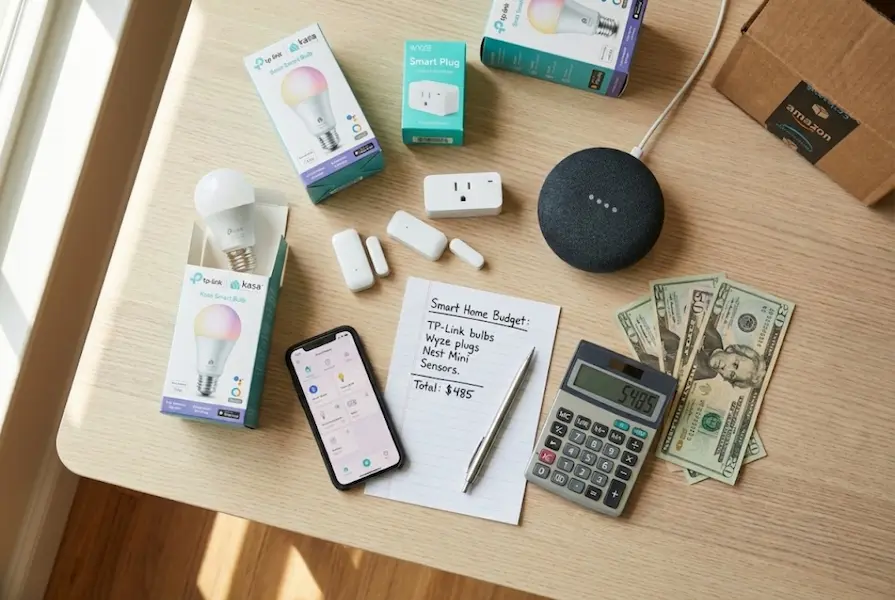
Small House/Large Apartment ($485):
- Google Nest Mini: $50
- TP-Link Smart Bulbs (8): $70
- Kasa Smart Plugs (6): $40
- Wyze Cam v3 (2): $70
- Nest Thermostat: $130
- Blink Video Doorbell: $50
- Contact Sensors (4): $25
- Motion Sensors (2): $50
Family Home ($685):
- Amazon Echo (4th Gen): $100
- Mixed Smart Bulbs (12): $110
- Smart Plugs (8): $60
- Wyze Cameras (3): $105
- Ecobee Smart Thermostat: $130
- Ring Video Doorbell: $100
- Full Sensor Kit: $80
Money-Saving Tips That Actually Work
Ways to save even more money:
1. Wait for Sales Smart home devices go on sale regularly. Black Friday, Cyber Monday, and Prime Day can save you 30% to 50%. Sign up for price alerts on items you want.
2. Buy Bundles Companies offer bundle deals that cost less than buying items separately. Amazon often bundles Echo devices with smart plugs or bulbs.
3. Start Small and Expand You do not need everything at once. Buy one room at a time. This spreads out the cost and lets you learn as you go.
4. Skip the Premium Brands (At First) Budget brands like Wyze, TP-Link, and Amazon’s basics work great. You can upgrade to premium brands later if you want.
5. Avoid Subscription Traps Some devices require monthly fees for recording or extra features. Many budget options offer the same features without subscriptions. Wyze cameras include 14 days of free cloud storage. Blink works without subscriptions.
6. Use What You Have Before buying new, check what works with smart plugs. Your existing lamp, fan, or coffee maker can become smart for just $10 to $15.
7. Choose Matter-Compatible Devices Devices with the Matter label work with everything. You will not waste money replacing things later or buying extra hubs.
Common Mistakes to Avoid
Learn from what others did wrong:
Mistake #1: Buying Non-Compatible Devices Always check if devices work with your chosen ecosystem (Alexa, Google, or Apple). The Matter label guarantees compatibility.
Mistake #2: Ignoring Your WiFi Smart homes need good WiFi. If your internet is slow or spotty, devices will not work well. A WiFi extender costs $30 to $50 and solves most problems.
Mistake #3: Forgetting About Power Some smart devices need constant power. Others run on batteries. Battery devices seem convenient but require replacements. Factor in battery costs.
Mistake #4: Over-Automating Too Fast Start simple. Get good at the basics before creating complex automations. Too many automations can confuse you and make things less convenient.
Mistake #5: Not Planning for Renters If you rent, avoid devices that require installation like hardwired switches or doorbells. Stick to plug-in devices and battery-powered options you can take with you.
Understanding Hidden Costs
Be aware of these additional expenses:
Subscription Services ($0 to $10/month): Most budget devices work without subscriptions. But some offer optional paid features like extended video storage or AI detection. Budget $0 to $5 per month if you want these extras.
Battery Replacements ($20 to $40/year): Battery-powered sensors and cameras need replacements. CR2032 batteries cost about $5 for a 4-pack. Rechargeable camera batteries cost $20 to $30.
WiFi Improvements ($0 to $100): You might need a better router or WiFi extender. Most modern routers work fine, but older ones might struggle. Plan $30 to $50 for an extender if needed.
Future Upgrades (Optional): Once you have basics, you might want to add more. Budget $50 to $100 per year for gradual expansion.
Ecosystem Comparison: Which Platform Wins?
An honest comparison for budget users:
| Feature | Amazon Alexa | Google Assistant | Apple HomeKit |
|---|---|---|---|
| Hub Cost | $50 | $50 | $100 |
| Device Selection | Excellent | Excellent | Good |
| Voice Control | Very Good | Excellent | Good |
| Privacy Focus | Moderate | Moderate | Excellent |
| Budget Options | Most | Many | Fewer |
| Ease of Setup | Easy | Easy | Very Easy |
| Best For | Budget buyers | Android users | iPhone users |
My Recommendation: Start with Amazon Alexa if you want the most device choices and lowest prices. Choose Google if you already use Android and Google services. Pick Apple if privacy matters most and you own Apple products.
The good news? In 2026, most devices work with all three thanks to Matter. You can even use multiple hubs if you want.
Your 3-Month Setup Timeline
A realistic plan:
Month 1: Foundation ($150 to $200)
- Buy your hub and set it up
- Add smart bulbs to your most-used room
- Get 2-3 smart plugs
- Learn the basic voice commands
- Experiment with simple schedules
Month 2: Expansion ($100 to $150)
- Add smart thermostat
- Expand lighting to other rooms
- Get a camera for your front door
- Set up basic automations
- Join online communities for tips
Month 3: Security and Refinement ($100 to $150)
- Add door/window sensors
- Get another camera if needed
- Add motion sensors
- Fine-tune your automations
- Identify what else you want
Future-Proofing Your Setup
Make sure your smart home stays current:
Buy Matter-Compatible Devices Matter is the new standard. Devices with the Matter logo will work with new products for years to come. IKEA, Amazon, Google, and hundreds of other companies now support it.
Choose Thread-Enabled Products Thread is a mesh network that makes devices respond faster and work more reliably. Look for “Thread” or “Matter over Thread” on product labels.
Stick to Major Brands Budget-friendly does not mean unknown. TP-Link, Wyze, Amazon Basics, IKEA, and Google all offer affordable devices with good support.
Keep Software Updated Apps and devices get updates that add features and fix problems. Enable automatic updates when possible.
Tips for Getting More From Your Setup
Once you get comfortable with the basics:
Use Routines and Scenes Instead of controlling devices one by one, create scenes. “Movie Time” could dim lights, close blinds, and turn on your TV with one command. All hubs support this for free.
Add Voice Shortcuts Create custom voice commands for common actions. Instead of saying “turn on living room lights to 50%,” train your assistant to understand “reading mode.”
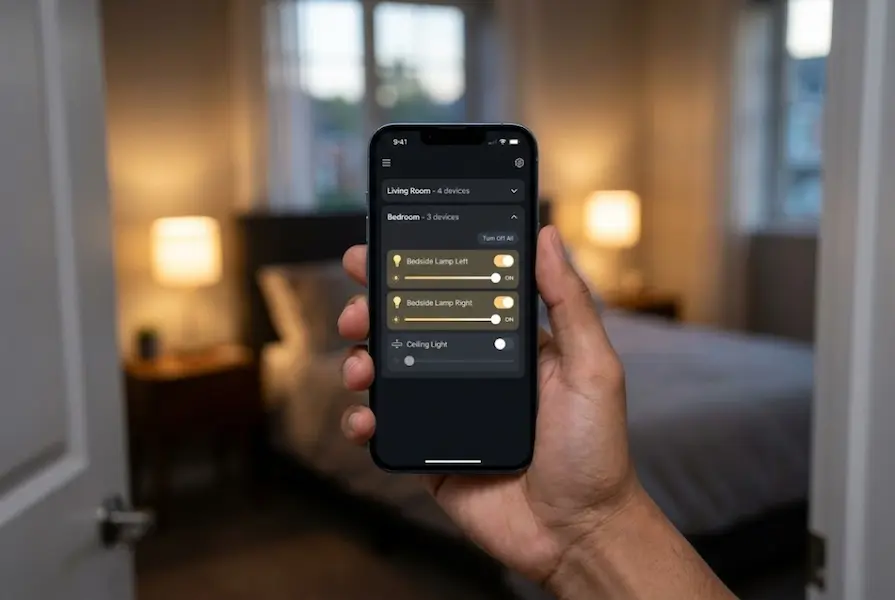
Group Devices by Room Organize your devices into rooms in your app. This makes control easier and faster. You can say “turn off bedroom” instead of naming each device.
Use IFTTT for Cross-Platform Automation IFTTT (If This Then That) is a free service that connects different smart home platforms. You can create automations that span multiple ecosystems.
Share Control With Family Add family members to your smart home. Everyone can control devices from their phones. Set permissions for kids if needed.
Troubleshooting Common Issues
Quick fixes for typical problems:
Devices Keep Disconnecting: Move your router closer or add a WiFi extender. Too many devices on one network can cause problems. Consider getting a mesh WiFi system.
Voice Commands Not Working: Retrain your voice assistant. Check microphone placement. Make sure you are using the exact device names set in your app.
Automations Not Triggering: Check your triggers and conditions. Make sure devices have power. Restart your hub. Update all apps and firmware.
App Not Finding Devices: Put your phone and device on the same WiFi network. Turn off VPN services temporarily during setup. Check if the device needs a firmware update.
Is It Worth It?
Let me be honest about the value:
You Will Save Money If:
- You use the smart thermostat (saves $100+ per year on average)
- You set up lighting schedules (saves $50+ per year)
- You catch problems early with sensors (prevents expensive repairs)
- You avoid subscription services
You Will Waste Money If:
- You buy devices you never use
- You choose incompatible devices that need replacing
- You pay for subscription services you do not need
- You buy premium versions when budget options work fine
Most people find that a $400 to $500 smart home setup pays for itself in 1 to 2 years through energy savings alone. Add in the convenience, security, and peace of mind, and it becomes a clear win.
Frequently Asked Questions
Do I need technical skills to set up a smart home?
No. Modern smart home devices are designed for regular people. If you can use a smartphone, you can set up a smart home. Most devices connect in 5 to 10 minutes using step-by-step app instructions.
Will a smart home work during a power outage?
Some features will work, others will not. Devices need power to operate. However, battery-powered sensors and cameras continue working. Once power returns, everything reconnects automatically.
Can I take my smart home with me if I move?
Yes. Stick to plug-in devices, battery-powered sensors, and smart bulbs. Avoid hardwired switches or doorbells if you plan to move. Everything else unplugs and moves with you.
What if my internet goes down?
Matter devices with Thread support work locally even without internet. You can still control them from your phone while on the same WiFi network. Cloud features like remote access will not work until internet returns.
How much electricity do smart devices use?
Very little. A smart bulb uses the same power as a regular LED bulb. Smart plugs use less than 1 watt on standby. Smart speakers use 2 to 3 watts. Your total smart home might add $2 to $5 per month to your electric bill.
Are smart homes secure?
Yes, when set up correctly. Use strong, unique passwords. Enable two-factor authentication. Keep devices updated. Major brands have strong security. Budget brands from reputable companies are also safe.
Can I mix brands?
Absolutely. Thanks to Matter, you can mix Amazon, Google, IKEA, TP-Link, Wyze, and hundreds of other brands. They all work together in 2026 without any problems.
Do I need a separate hub for everything?
Not anymore. Your smart speaker (Echo, Google Home, HomePod) acts as the hub. Matter eliminated the need for brand-specific hubs in most cases.
Final Thoughts
Building a smart home in 2026 on a budget is possible and practical. Technology has matured, prices have dropped, and everything finally works together thanks to Matter.
Start small with a $200 to $300 investment. Focus on lighting and voice control first. Add security and temperature control next. Expand gradually as you learn what works for your lifestyle.
Avoid the temptation to buy everything at once. Take your time. Experiment. Join online communities. Learn from others. Your smart home should make life easier, not more complicated.
Home automation in 2026 is surprisingly affordable. With this guide and a budget of $400 to $600, you can create a smart home that rivals setups costing thousands just a few years ago.
Welcome to smart home living. Your home is about to get a whole lot smarter.